

EXCITING SQUARESPACE 7.1 EDITOR UPDATE | SAVED SECTIONS ARE HERE
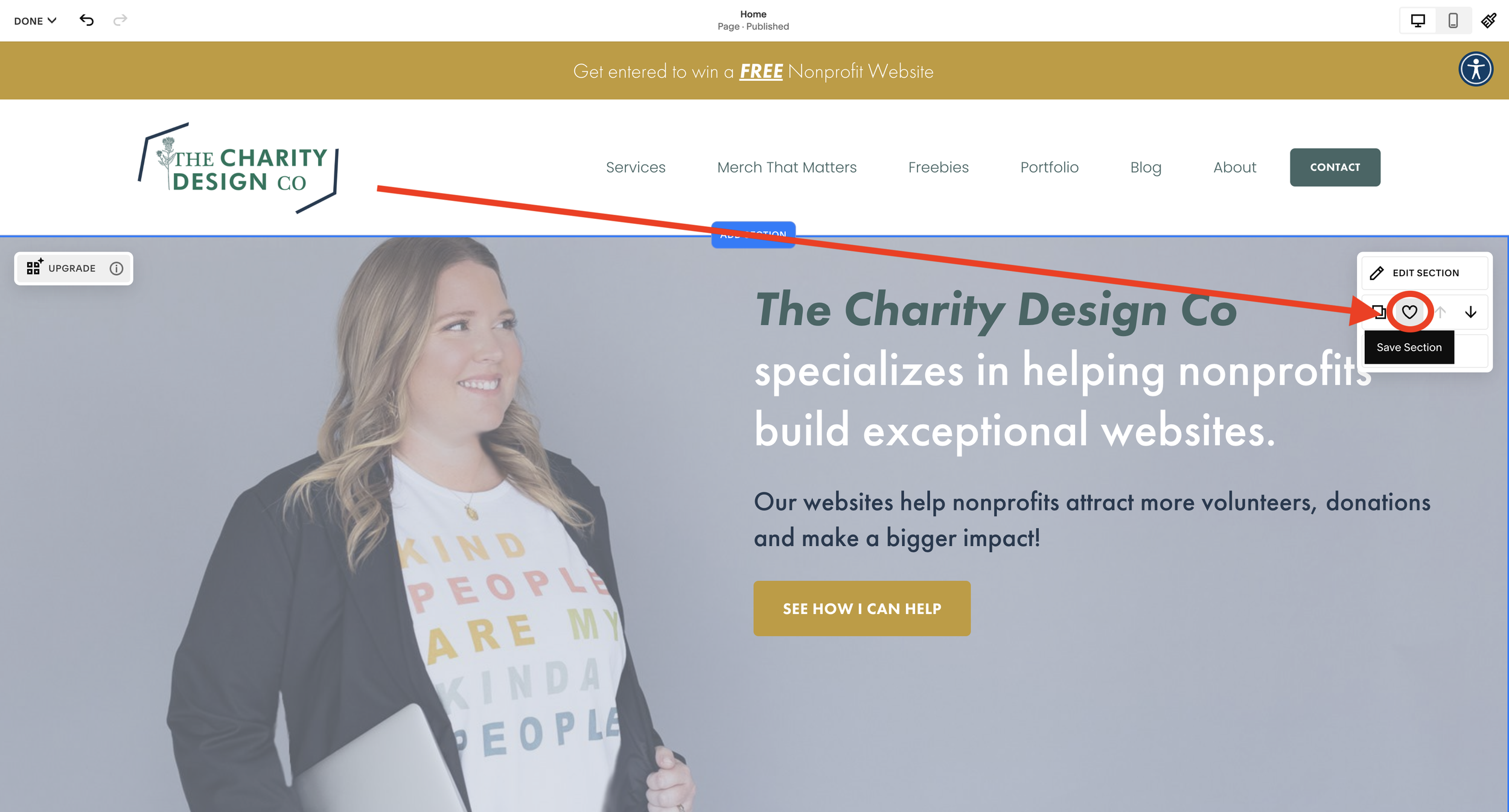
The much anticipated and requested feature has finally been added! SAVED SECTIONS!
Guys, Squarespace has done it again! The web design world is a buzz with news on yet another needed and stellar update! This new update is rolling out to 7.1 sites, so to all my clients who are on 7.1 or any internet browsers… let’s discuss what this means like how do you use them, what are the limitations and who gets them?
Let’s discover all of this and more so that you know all you need to about the new Saved Sections feature from Squarespace 7.1.
If you are on 7.0 or are unsure which version of Squarespace you are sporting, follow these steps:
Log into your Squarespace account
Click on Help
At the very bottom, under the button/section options you will either see “Squarespace Version 7.1” OR “Squarespace Version 7.0”. If you see 7.0 you are good to go and don’t need to read any further.
What are “Saved Sections”? And How Do You Use Them?
Squarespace’s Saved Sections are much like any “liked” or saved block on other web builders like Elementor or Webflow. This much-requested feature is a huge time saver and hopefully is an indication of what is to come from Squarespace in the near future.
EXPLORE SAVED SECTIONS WITH DANI
Uncover how to use the new SAVED SECTIONS on Squarespace 7.1 websites.
What Are The Limitations of Squarespace’s Saved Sections?
There are limitations with the new update of these Saved Sections. Please keep them in mind so you don’t make silly mistakes that can cost you a donation.
GIANT COPY-AND-PASTE
Think of these little Saved Section nuggets like “screenshots”. They will NOT update across pages, timelines, or dimensions. It’s a giant copy-and-paste. So, if you have the same section on multiple pages and an update is required in each location. This just saves building time.
ONLY 50
You are limited to how many Saved Sections you can save. This isn’t like your photostream people. 50 pages so keep it neat like I like my scotch.
CAN’T BE SHARED
You cannot share any Saved Sections to other websites you have on Squarespace nor will they copy over when you duplicate to a new trial or template. (Granted, we hope this will be a new feature soon).
Who has access to Saved Sections?
Currently, this new feature update is only available to 7.1 users. There is no word when or even if 7.0 users will be getting this so it makes sense to make the switch if you can. Daily, 7.1 is getting more and more stable. So make the jump if you are ready or questioning it.
If you are on 7.1 and still do not see it. Don’t worry. I will show up. Promise. It’s rolling out across sites and should be to your URL shortly. Reach out to support if it’s still not there come Spring 2023.




Boost donor engagement with this step-by-step SEO strategy for nonprofits on Squarespace. Simple, actionable tips to maximize your mission's reach.